Create your account and company
Sign up, confirm your email address, and set up your company.
These steps are for the person setting up InternROI for their company. Supervisors and interns don’t sign up here — they join by invitation, from the link in the email their company sends.
1. Sign up
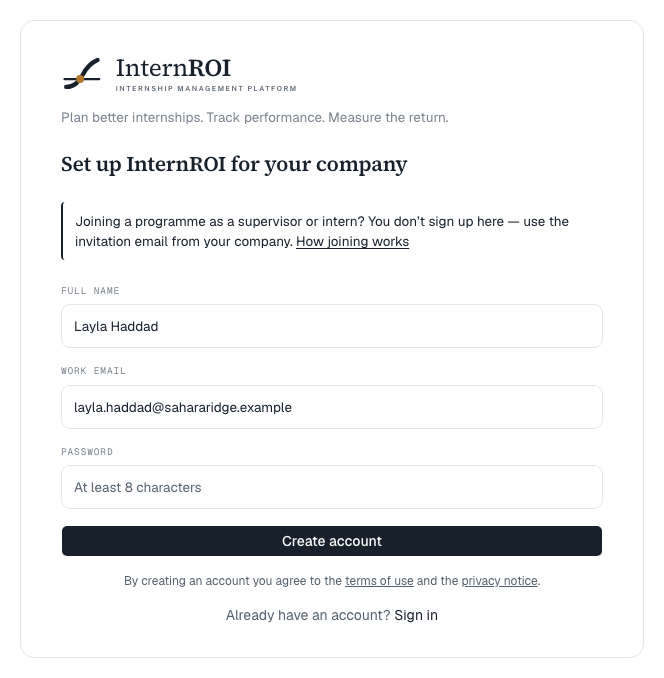
- Go to Get started. The page is headed Set up InternROI for your company.
- Enter your Full name, Work email and a Password of at least 8 characters.
- Choose Create account.
You will see Check your inbox — we sent a confirmation link to finish setting up. Open the email and choose the link. If it does not arrive, check your spam folder.
2. Set up your company
After confirming, you see Welcome to InternROI. You have two choices:
- Set Up My Company — create your real company account.
- Explore Demo — look around with example data first. See The sample programmes.
To set up your company, fill in Company name, Industry, and optionally Employee count and Emirate, then choose Create company. You can add your logo later under Organisation.
You are now the company’s first admin, and you land on your dashboard.
3. Next steps
Your dashboard shows what comes next under First programme:
- Create the programme — name, dates, how many interns.
- Calculate the expected ROI — about ten minutes.
- Build the work plan and choose the KPIs it is measured against.
- Add supervisors and interns, and invite them.
In parallel, verify your company — you need it before you can pay and launch, and it runs in the background while you set up.
Messages you might see
- An account with this email already exists — sign in instead.
- That password is too easy to guess — try a longer one. — the password appears in known data breaches. Choose a longer one you don’t use elsewhere.
- Sign-ups are currently closed. — new company accounts are paused. Invitations to existing programmes still work.