Verify your company
Send your trade licence details so you can pay and launch programmes.
Before you can pay for a plan and launch a programme, we confirm your company is real. It takes a minute to send, and you can carry on setting up while we review it.
Send your details
- Go to Organisation.
- In Company profile, fill in Company website and Office address.
- In Verification, fill in:
- Legal name, as on your trade licence
- Trade licence number and Licence expiry date
- Who issued the licence — choose the authority, or Other and name it
- Tax registration number (TRN) — optional
- Optionally, under Copy of your trade licence, choose Upload a copy (a PDF or image, up to 10 MB). It speeds things up if your licence is hard to find in the public register.
- Choose Verify company.
Everything on this screen saves as you type — there is no Save button.
What happens next
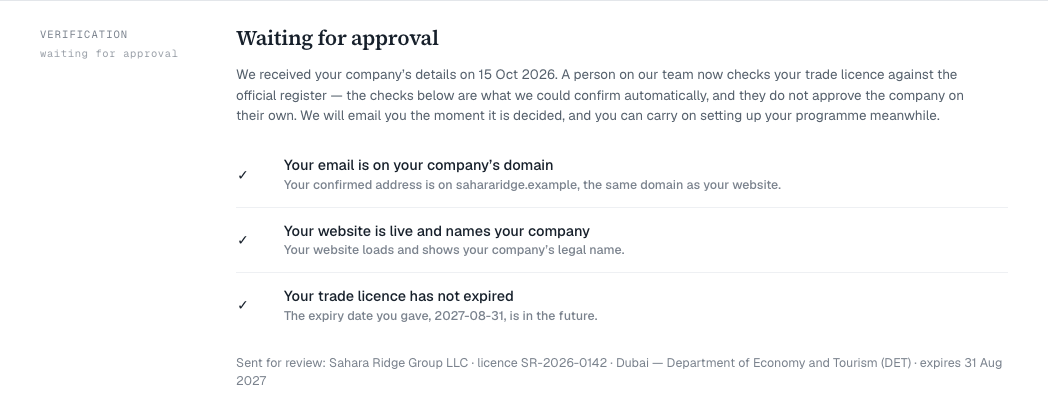
You will see Waiting for approval. We run a few automatic checks — for example, that your email is on your company’s domain and your website is live — and then a person on our team checks your licence against the official register. We email you when it is decided.
- Approved: you have three days to arrange payment — the payment window. See Choose a plan and pay.
- Not approved: the reason is shown in the Verification band. Correct the details and choose Send again.
Keep it current
When your licence is renewed, update the expiry date. Changing any licence detail sends it to us to check again, and you stay verified while we do.
If you see Add … before asking to be verified, fill in the field it names.