Apply for a placement
Apply to an opening with your InternROI account, follow where each application stands, and withdraw one.
Companies on InternROI publish their internship openings. Signed in, you find them under Opportunities Nearby in the menu; opportunities-nearby.com lists the same openings for anyone. Each opening leads to its own page on InternROI, at app.internroi.com/apply/…, where you apply with your InternROI intern account. You need an account to apply.
Find an opening
Choose Opportunities Nearby in the menu, under Next step. Every listed opening is there, newest first.
- Press an emirate on the strip to see only its openings; press it again for all of them. Your own emirate is marked You.
- Narrow by start (for example By Jan) and by hours (Up to 6 h or Full days), or turn on Hide ones I applied to. Clear filters shows everything again.
- Each opening shows the skills it asks for — the ones on your profile are marked — and Skills 3 of 5 with where it is from you (In Dubai, Next to Dubai or Not in Dubai).
- Press an opening’s title to open it beside the list: its dates, hours and description, and what the company will see if you apply. Open its page to apply takes you to its page on InternROI.
- Beside the list, Your profile, as companies read it shows your emirate, level, languages and skills, and Asked for, not on your profile counts the skills openings ask for that your profile does not list. Add a skill on My profile only if you have it.
If a company shows applicants a fit percentage, the same number shows on each opening here, counted from your profile with the same weights for every opening — the company sees it on Review applicants.
Before you apply
- An intern account — see Create your intern account.
- A date of birth on My profile, and a parent or guardian if you are under 18.
- You are not part of the company: not one of its admins, and not on one of its programmes right now. If you interned there before and that placement is over, you can apply again.
Apply to an opening
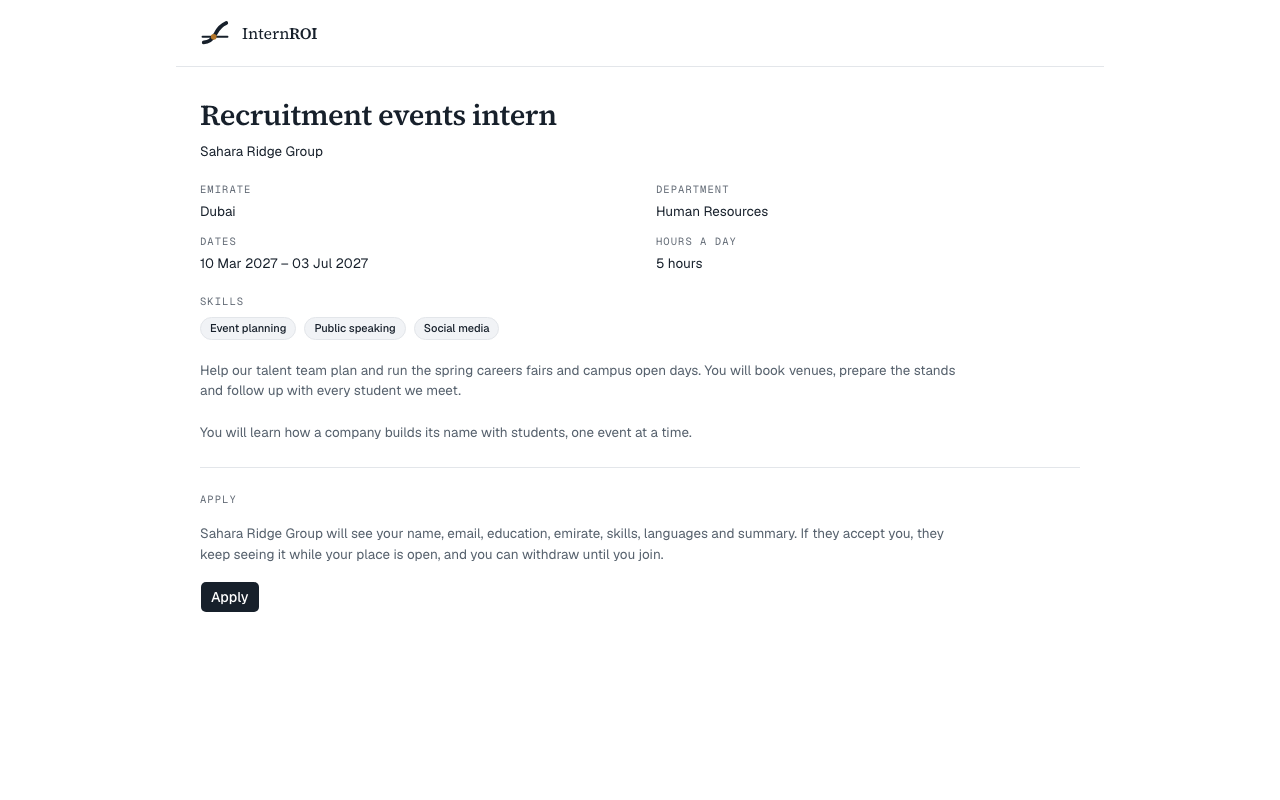
- On Opportunities Nearby or opportunities-nearby.com, choose an opening and follow its link to apply. Its page on InternROI shows the opening on the left — the title, the company, any Emirate, Department, Dates (with how long it runs and a strip of the months), Hours a day, the apply-by date with the days left and the places, the Skills (a must-have is starred), the description, and After you apply — and the Apply card on the right. On a phone the card follows the opening, and a bar at the foot takes you to it.
- On the Apply card, if you are signed out, choose Create an account or Sign in. Either way you come back to this page.
- If your profile has no date of birth yet, choose Complete my profile, fill it in, then choose Back to the opening.
- Read what the company will see: your name, email, education, emirate, skills, languages and summary. If you are under 18, it also sees that — never your date of birth.
- Choose Apply.
The page now says You applied on …, and the company’s admins are told.
Follow your applications
Choose My applications in the menu. If a company has offered interview times, they come first, under Waiting on you: the times grouped by day, and Please answer by …. Choose a time, then Book … to book it — choosing alone books nothing — or None of these suit me to ask for other times with a short note. A booked interview shows as a ticket under Your interview, with Add it to your calendar.
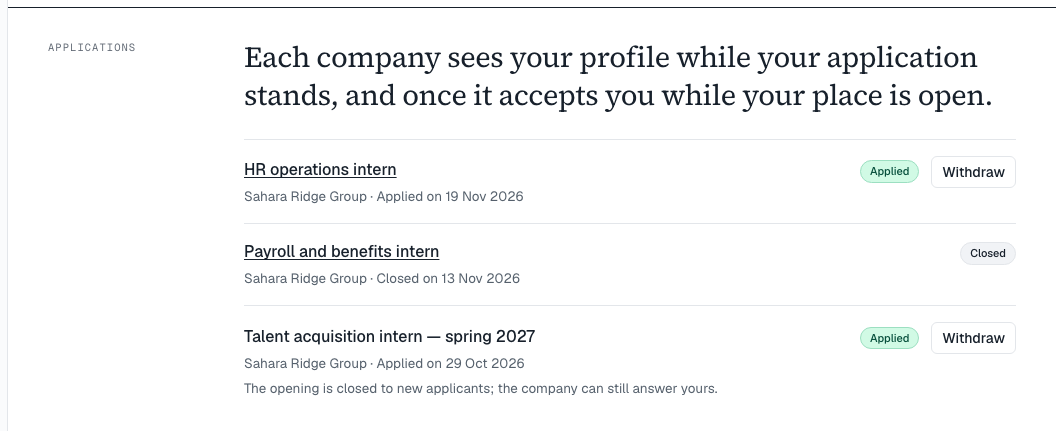
Under Your applications, newest first, each application shows the company and the opening’s emirate, its track — Applied, Shortlisted, Interview, then the company’s answer, each with the day it happened — what the company has done in one line, and a status:
- Applied — your application stands, and the company can see your profile. If the company has closed the opening, the line under it reads The opening is closed to new applicants; the company can still answer yours.
- Accepted — the company accepted you onto one of its programmes and invited you. The line under it says where the place stands — for example Accepted — … invited you to …. Accept your place from your home page., with Go to my home page.
- On the roster — you accepted the invitation and joined the programme.
- Closed — the company closed your application. You are not emailed about it.
- No longer listed — the opening has ended, or is no longer listed.
- Withdrawn — you withdrew it.
While an opening is listed, its title links back to its page. Your home page shows your three newest applications under Your applications.
When a company accepts you
Being accepted means the company has invited you to one of its programmes. You are on its roster once you accept the invitation:
- The invitation arrives by email, and your home page shows it under Your invitation is waiting.
- Choose Accept, or open the link in the email.
The invitation expires after 14 days. If it does, the line reads Accepted, but the invitation has expired — ask … to send it again. More in Join a programme you were invited to.
Withdraw an application
- Choose Withdraw on My applications, or on the opening’s page.
- Choose Yes, withdraw — or Keep it to leave the application as it is. For an accepted application, the question names the programme whose place you give up.
- You can withdraw while your application stands — even once the opening is closed or no longer listed — and an accepted one until you join the programme.
- Withdrawing an accepted application cancels its invitation and gives the place back.
- Nobody is told. The company stops seeing your details.
- While the opening is still listed, choose Apply on its page to apply again.
Once you have joined the programme, or the company has closed your application, it can no longer be withdrawn or re-opened.
Messages you might see
- This opening is no longer listed. — it was closed or has ended, or the link is wrong.
- You are part of … on InternROI, so you cannot apply to its openings. — you are its admin, or on one of its running programmes.
- This account is not an intern account. Sign out and create an intern account to apply. — you are signed in with a company’s or a school’s account. Choose Sign out.
- Before you apply, add your date of birth on My profile. If you are under 18, a parent or guardian goes on the profile too.
- This application is closed. — the company closed it.
- That application has already been answered. — you have joined the programme, or the company closed it.
- Your applications could not be read just now. Please reload the page.