Your CV
The CV InternROI writes from your profile and from what each company recorded, and how to save it as a PDF.
My CV is written for you: the top is what you wrote on your profile, and the rest is every placement as its host company recorded it. Nothing is typed twice — each placement is added as it happens and fills in as your supervisor accepts your work. Choose My CV in the menu. It starts from your profile, so fill that in first.
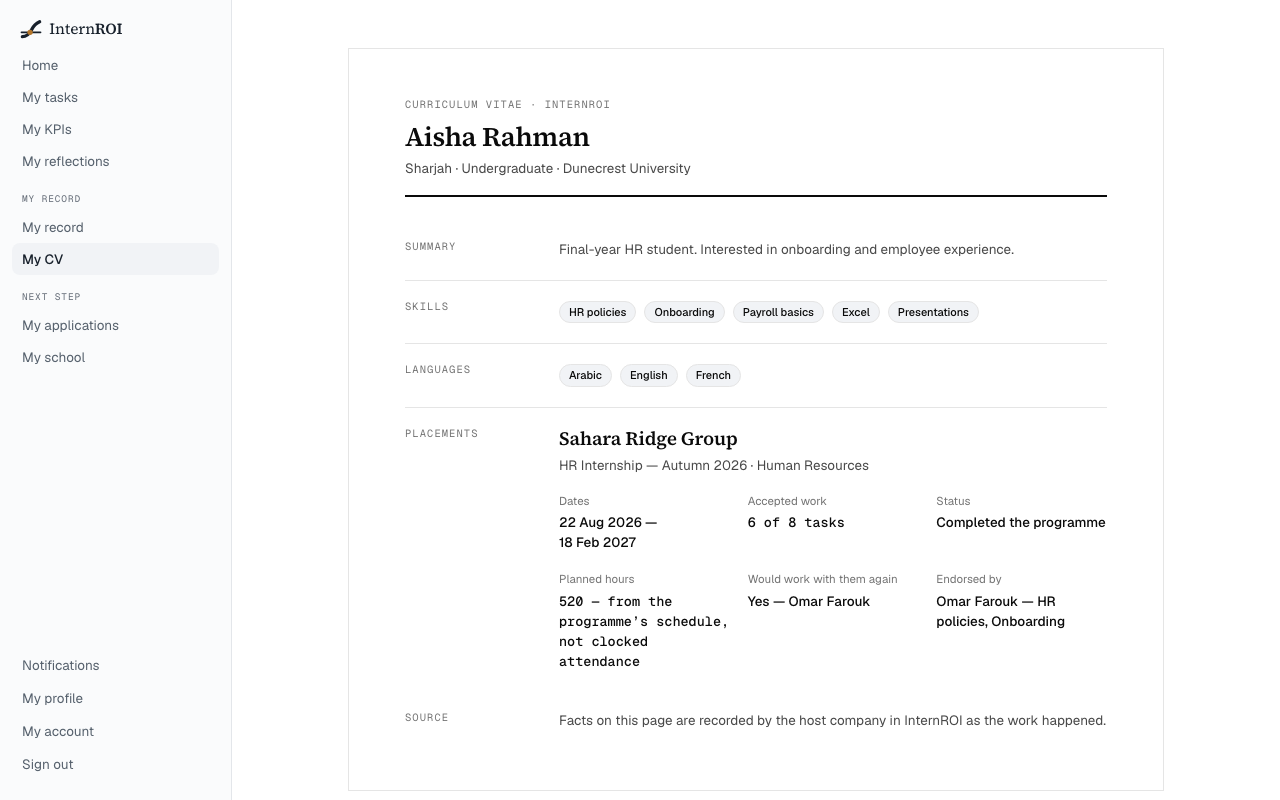
What is on it
At the top: your name, emirate, education level and school or university. Then two parts: In your words — your Summary, Skills and Languages, from My profile, with Edit on My profile — and As the companies recorded it, which nobody edits, you included.
Under Placements, newest first, each placement shows the company, the programme and department, and:
- Dates — the dates the programme ran, to the day the company ended it if it ended early.
- Accepted work — tasks accepted out of tasks assigned, for example “7 of 9 tasks”.
- Status — Completed the programme, Currently participating, Withdrew before the end or Ended early.
- Planned hours, when shown — from the programme’s schedule, not clocked attendance. InternROI does not record time.
- Certificate, on a completed placement — a certificate of completion opens with your record link.
- The names of the tasks that were accepted.
A placement a company removed you from is left off. At the foot, under Source: Facts on this page are recorded by the host company in InternROI as the work happened.
Ratings, only if you choose
Ratings are off your CV until you switch on Share my supervisors’ ratings and endorsements on my CV and record on My profile. While it is on, a placement can also show:
- Supervisors’ rating — their average, for example “4.2 of 5 on average — shown at the intern’s choice”, on placements that were rated.
- Would work with them again — each supervisor’s Yes or No, under their name, given when your placement was marked complete.
- Endorsed by — each supervisor by name, with the skills from your profile they saw at work.
With two or more completed placements rated, Ratings across placements shows each one’s average, oldest first — for example “3.5 → 4.0”.
Switch it off and all of this leaves your CV at once. The CV never says that a rating is hidden; only you see the line Your supervisors’ ratings and endorsements are kept off your CV. Your choice, on My profile. on the screen, and it is not printed.
Save it as a PDF
- Choose Download PDF.
- Your browser’s print window opens. Choose to save as PDF, or print it.
Only the CV itself goes on the page. Download PDF appears once your profile has a date of birth, and a guardian if you are under 18; until then the page shows a notice and Complete my profile.
Share it by link
To send the facts to someone instead, issue a link to your verified record under Share verified record on the same page. The record carries only your completed placements, and nothing you wrote about yourself — see Your verified record.
My CV is different from My record, which is one programme’s record of participation — see My KPIs and My record.
Messages you might see
- Add your date of birth on My profile before sharing your CV. If you are under 18, a parent or guardian goes on the profile too.
- Your CV starts with your profile. — you are on a programme but have not started your profile. Choose Start my profile.
- No placements yet. The first appears here when a company rosters you, and fills in as your supervisor accepts your work.
Next: share your verified record.