Follow a running programme
Where to see progress, what needs you, and what happens at the end date.
Once a programme is running, open it to see its overview. Your dashboard shows the same for your main running programme.
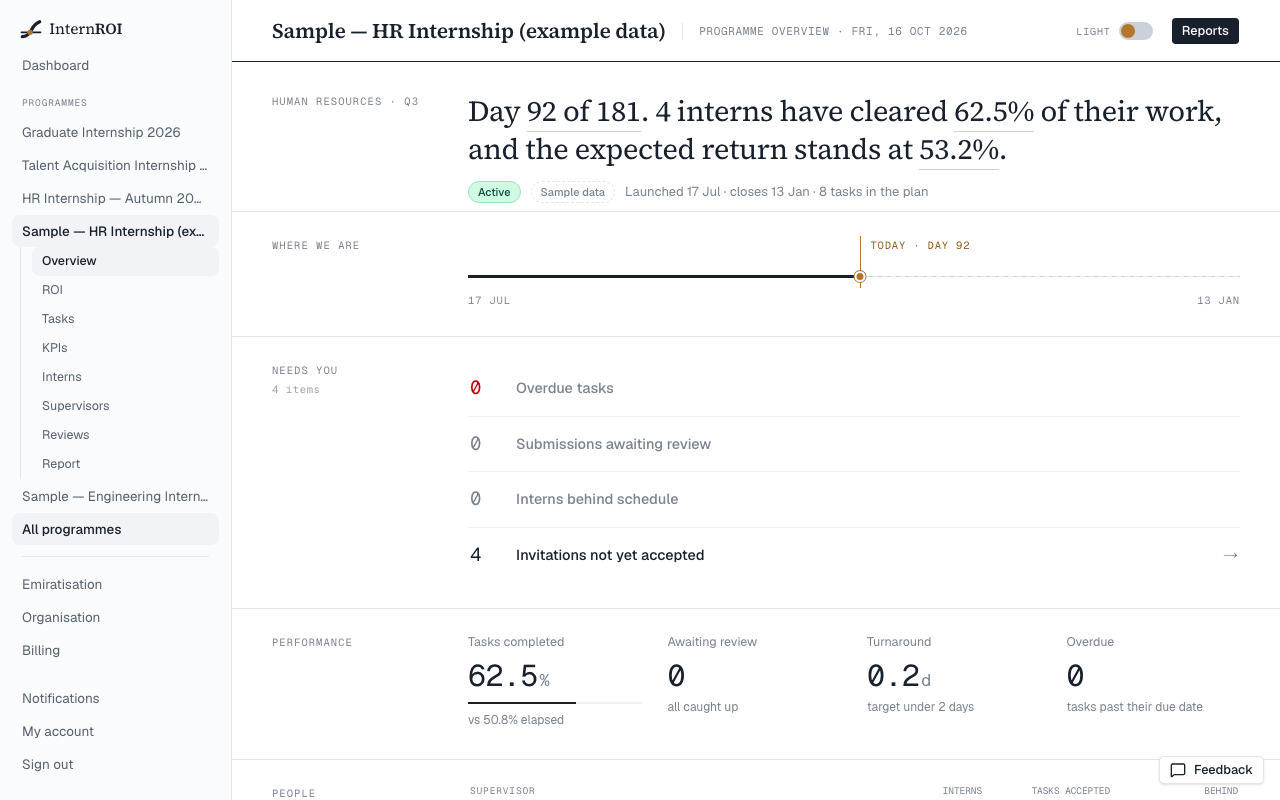
- Needs you — overdue tasks, submissions awaiting review, interns behind schedule and invitations not yet accepted, each linking to where it can be dealt with.
- Performance — tasks completed, work awaiting review, how long reviews take, and what is overdue.
- People — each supervisor, their interns and the work accepted.
- Economics — the saved ROI baseline’s figures. See Read your ROI results.
Behind schedule
On the Interns screen, an intern is Behind when at least one of their tasks is past its due date and not yet accepted — an observable fact, not a judgement about the intern. Filter by On track, Behind or Not joined.
Reviews
Reviews in the programme’s menu lists the submissions Waiting for a supervisor and those already Decided. Supervisors make the decisions — admins don’t review work themselves unless they are also a supervisor on the programme.
The planned end date
A programme does not end on its own. When the planned end date arrives, a Planned end notice appears and admins are notified. The programme keeps running — interns can still start and submit work, and it still counts towards your plan — until you end it.