Read your ROI results
What each figure on the results means, and how the verdict is worded.
Open the ROI wizard’s Review step and choose Open the full results view.
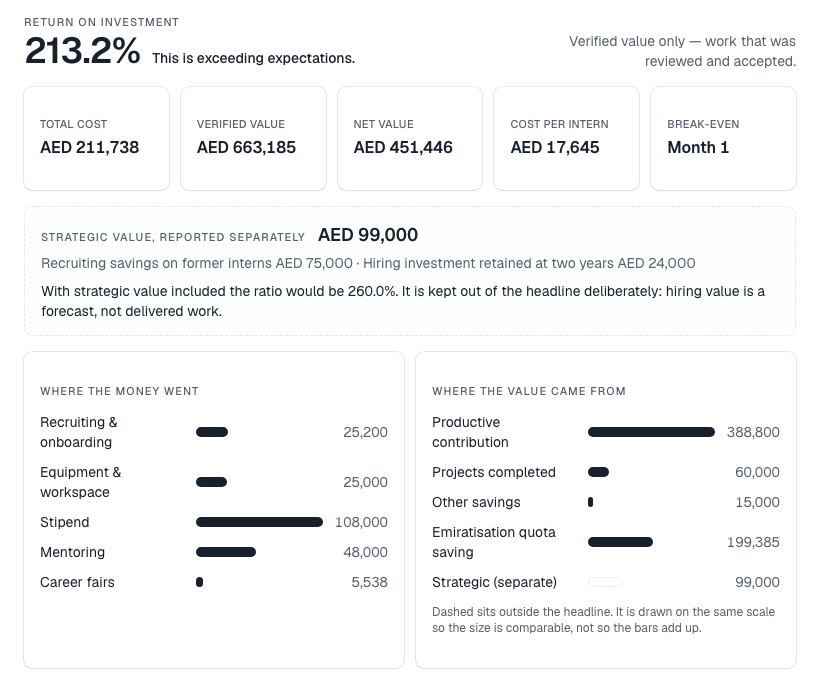
The headline
- Return on investment — the percentage, from verified value only. It shows — while total cost is zero.
- A one-line verdict, for example This is strong.
The verdict bands, each meaning “and above”:
- 100% — exceeding expectations
- 80% — excellent
- 60% — strong
- 40% — really good
- 20% — promising
- 0% — progressing
- Below 0% — a negative return
The figures
- Total cost, Verified value, Net value (value minus cost) and Cost per intern.
- Break-even — the month the programme’s cumulative value overtakes its cost, or Not within the programme.
- Where the money went and Where the value came from — each line’s share. Strategic value is drawn dashed: on the same scale, but outside the headline.
- Cumulative net value — month by month, and where it crosses zero.
- With National Talent Impact switched on, a National Talent Impact card shows the Emiratisation quota saving.
If you have only entered costs so far, you will see the costs but no ratio: a ratio against costs alone would read as a loss that is not there.
Where else the figures appear
Your dashboard and each programme’s overview show the saved baseline’s figures in an Economics band — Verified — enters the ROI figure on one side, Strategic — reported alongside, never added on the other. These read the saved baseline, so they only appear once you have saved one.
See How InternROI estimates a programme’s return for what each line includes.