Save the baseline
Freeze your assumptions as the plan the programme is measured against.
A baseline freezes today’s assumptions — and the figures they produce — as the plan this programme is measured against. A programme cannot launch without one.
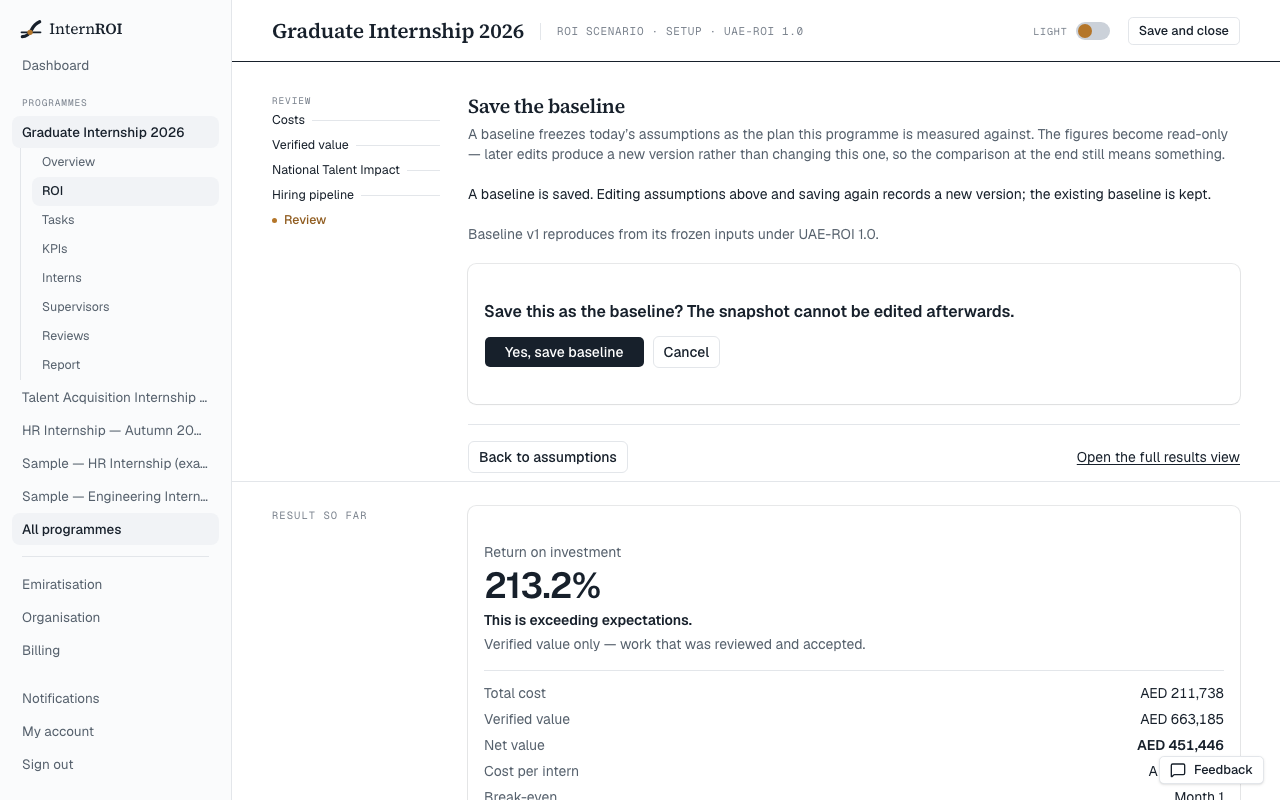
- In the ROI wizard, go to Review.
- Choose Save baseline.
- Confirm with Yes, save baseline (1).
What saving does
- The baseline is numbered — v1, then v2 and so on — and cannot be edited or deleted.
- You can keep editing your assumptions afterwards. They only become a new baseline when you save again, which records the next version. Earlier versions are kept.
- The current baseline feeds the Economics figures on your dashboard and programme overview, every report you generate, and the Emiratisation screen.
If the button is not available, you will see Fill in the required figures before saving — the panel lists what is missing.
The check under the baseline
Each time you open the Review step, the product recalculates your saved baseline from its frozen inputs and confirms it still reproduces — Baseline v1 reproduces from its frozen inputs…. If it ever says it does not reproduce, treat the saved figures as unverified, save a new baseline, and tell us.