Finish a placement
When an intern’s placement is marked complete: say whether you would work with them again, endorse the skills you saw, and where both appear.
When a company admin marks an intern’s placement complete, each of the intern’s supervisors is asked one question: would you work with this intern again? At the same time you can endorse the skills you saw them use at work. Both are final, both carry your name, and both can appear on the intern’s record if the intern chooses to share it.
Who marks a placement complete
A company admin, not the supervisor. On the Emiratisation screen, they set the intern’s Outcome to Completed — see The Emiratisation screen. If one of your interns has finished and you have not been asked, tell your programme admin.
Once a placement is complete, the intern leaves your Weekly check-in band: there are no more check-ins to write.
You are asked
Each of the intern’s supervisors gets a notification, in the app and by email — for example, Ahmed Hassan has completed Summer Internship 2027, with One question while it is fresh: would you work with Ahmed again? Choose it to open My interns.
You are asked once. If the placement is moved back to in progress and then marked complete again, you are not asked again once you have answered, or while you still have the first notification.
Answer the question
- Choose My interns in the menu and go to the At completion band. Its heading counts your answers — for example, “1 of 2 answered”.
- If the intern lists skills on their profile, you will see Which of these did you see at work? They appear under your name. An endorsement cannot be taken back; you can add more later. Tick each skill you saw. You can leave them all unticked.
- Beside Would you work with Ahmed again?, choose Yes or No.
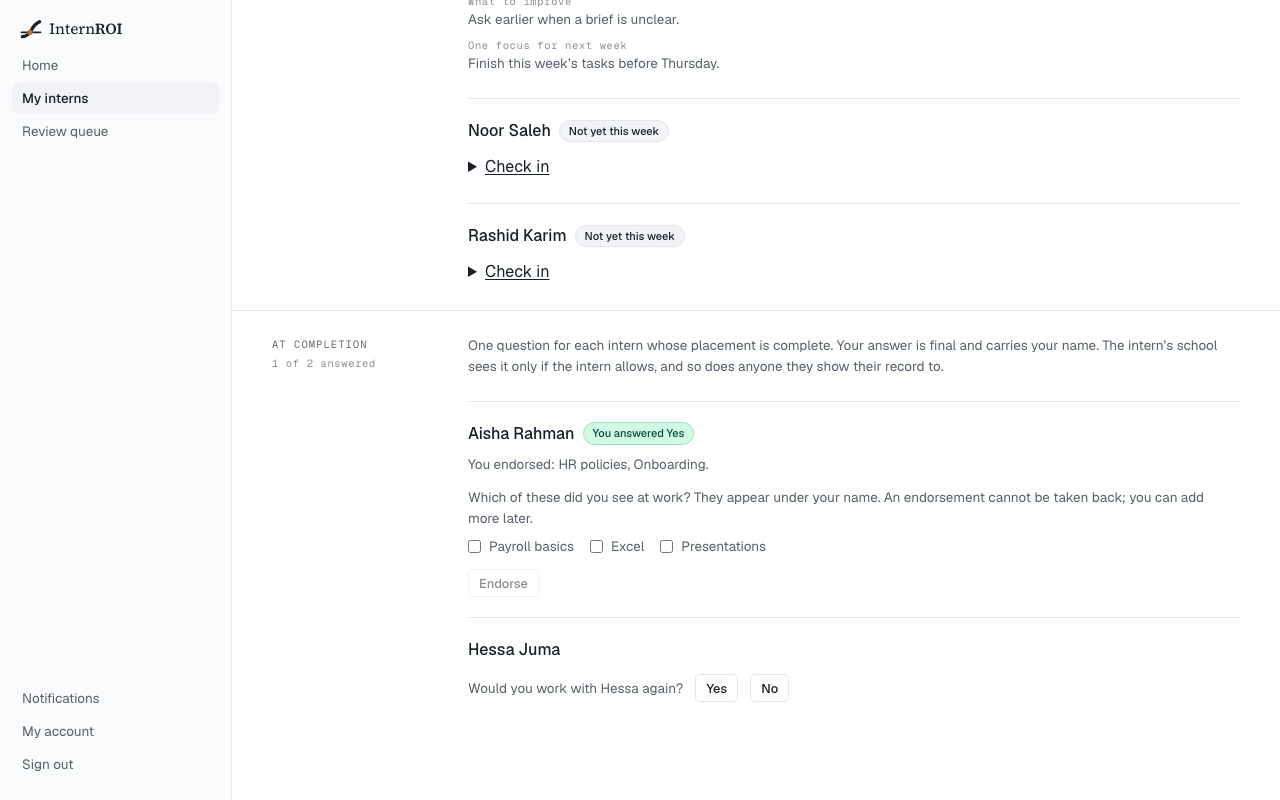
Your answer and any skills you ticked are saved together. The intern’s row then shows You answered Yes or You answered No.
Endorse skills after answering
The skills you have not endorsed stay on the intern’s row, under You endorsed: … naming those you have. Tick any more you saw and choose Endorse — now or later. Once every skill the intern lists is endorsed, nothing more is offered.
You can endorse only skills the intern lists on their own profile — you cannot add one. If they list none, you are asked the question alone.
Where your answer appears
- The intern’s CV and verified record — only while the intern has switched on Share my supervisors’ ratings and endorsements on my CV and record on their profile. Would work with them again shows your answer beside your name, and Endorsed by shows your name with the skills you endorsed. The certificate of completion on their record carries your endorsements too. See Your verified record.
- The intern’s school — only if the intern has switched on Share my supervisors’ ratings and whether they would work with me again for their school: your answer, with your name, appears on the completion report the school issues. Endorsements never go to the school. See Completion reports.
While the intern keeps sharing switched off, their CV and record show none of it.
Messages you might see
- You have already answered — the answer is final. — your answer was already saved, perhaps in another window.
- You can answer once the placement is marked complete. — the intern’s outcome has been changed since you opened the page.
- You can endorse only skills the intern lists on their profile. — the intern changed their skills since you opened the page. Nothing was saved: reload the page and answer again.
- You have already endorsed that skill. — reload the page to see what is saved.
- That intern is not one of yours — the intern has been moved to another supervisor.