Issue a completion report
Once a placement has ended, issue a document that says which of your requirements were met — and never changes.
A completion report says which of your requirements a student’s placement met, with the evidence the company recorded, as of the day you issue it. It never changes afterwards. Any admin of your institution can issue one.
When you can issue one
Once the placement has ended — the company marks it complete or ends the programme, or its planned end date passes. While it runs, the student’s reports page says The placement on … is still running.
Issue a report
- On Students, choose the student’s name.
- In the Completion report band, choose Completion reports.
- Choose Generate completion report.
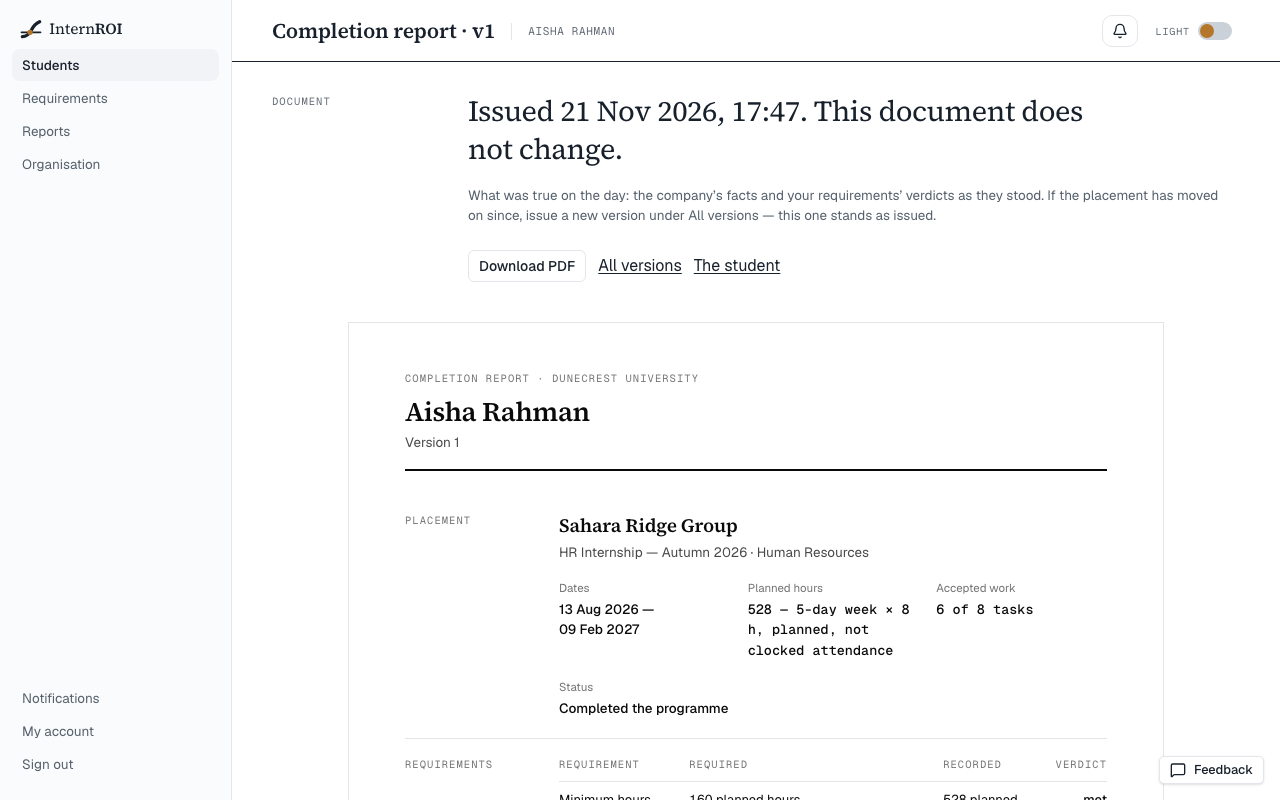
The report opens, headed Issued with the day and time and This document does not change.
What it contains
- Your institution, the student’s name, cohort and student number, and the version.
- Placement — the company, programme and department, the Dates, Planned hours, Accepted work and Status: Completed the programme, Withdrew before the end, Ended by the company or Still participating when issued.
- Requirements — every rule you had switched on, as Required, Recorded and Verdict.
- Reflections — how many weekly reflections were written, and whether the final report was submitted.
- Assessment — either Assessment included with the student’s consent on …, with the supervisors’ average rating and their answers to Would the company work with this student again?, or Assessment not included: the student did not share supervisors’ ratings with the school.
- Source — who issued it and from whose facts, the report’s number and date, ending The school grades; this document supplies evidence.
A report never changes
What a report says is what was true on the day. A student who stops sharing their ratings afterwards changes your board, not a report already issued, and nor do later changes to your requirements.
If the placement has moved on — the company marked it complete after you issued, say — choose All versions, then Generate a new version. Each version is numbered, and the earlier ones stand as issued.
Find and share reports
Reports in the menu lists every report your institution has issued, newest first, with the student, company, programme, version and date. A student’s own versions are under Completion reports on their page.
To send a report, open it and choose Download PDF. Your browser’s print window opens: choose to save as PDF. There is no share link.
How long reports are kept: How long data is kept.
Messages you might see
- The placement has not ended — wait until it has.
- The supervisors’ answers could not be read just now. Try again in a moment. — nothing was issued.
- Could not read the placement just now. Please try again.
- This school's account is suspended. — reports cannot be issued until your account is reinstated. Those already issued can still be read.