Getting started as an intern
Join your programme and find your way around your dashboard.
Join your programme
Your company sends you an email invitation. Open the link in it: you see Join your programme, naming your company, the programme and your role, with your email already filled in. Choose Create account and join — or, if you already have an InternROI account, Sign in and then Sign in and join. A new account confirms your email address first; the link in the confirmation email finishes joining, and you land on your dashboard.
Don’t sign up with Set up InternROI for your company — that page creates a company, not an intern account.
The link works once and lasts 14 days. If it has expired, ask your programme admin to resend it. Step by step: Join a programme you were invited to. Stuck? See Problems accepting an invitation.
Your dashboard
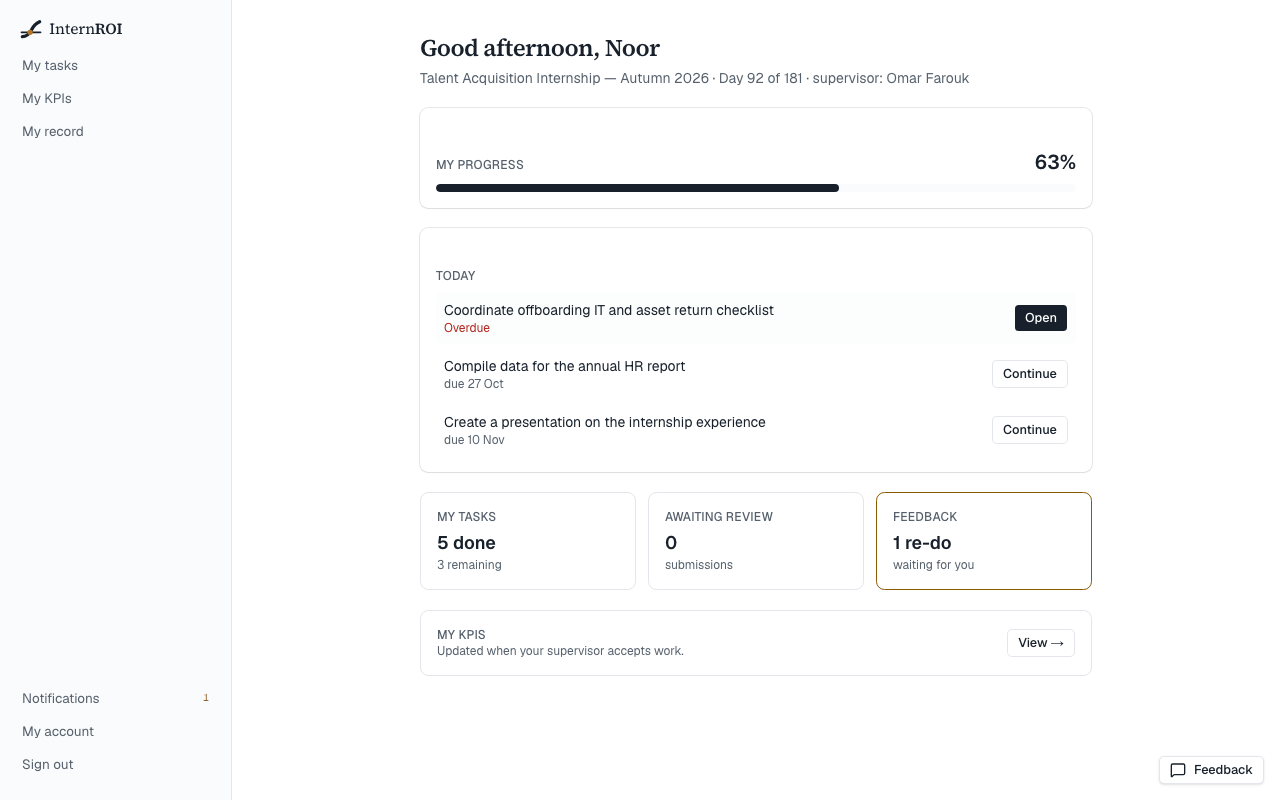
- The greeting shows your programme, the day you are on, and your supervisor.
- My progress shows how much of your assigned work has been accepted, weighted by how much each task counts. It shows — until you have work that counts towards it.
- Today lists anything due today or overdue, and the next few tasks coming up. Choose Open or Continue to go to a task.
- My tasks, Awaiting review and Feedback count your work in each state. Feedback shows how many tasks have been sent back for a re-do.
If your programme has not started yet, you will see the date it starts. Your tasks appear when it does.
Your menu
- My tasks — everything assigned to you. See Your tasks.
- My KPIs — how your accepted work measures up. See My KPIs and My record.
- My record — a printable record of what you completed.
- Notifications, My account and Sign out are at the bottom.