Follow your students’ placements
Read the placement board and each student’s page: what the company recorded, judged against your requirements.
Once you have confirmed a student, you can follow their placement. Everything you see is what the company recorded in InternROI, read live and judged against your own requirements. Only placements run on InternROI appear, and only once the student has joined the company’s programme with the account they linked to you. Any admin of your institution can read it.
The board
Students is your home. At the top, three figures: Placed (on a programme), Unplaced (confirmed, no placement yet) and At risk. Below them, your students in two groups.
Placed lists each student with:
- Placement — the company and programme, and the dates as they turned out, marked “(ended early)” when the company ended it before its planned end.
- Tasks — for example “6 of 10 tasks accepted”.
- Reflections — weekly reflections written against the weeks so far, for example “5/6 reflections”.
- Requirements — for example “4 of 5 met · 1 needs consent”. Only rules that can be judged today are counted.
Unplaced lists confirmed students with no placement yet, with Needed by — the term end you set.
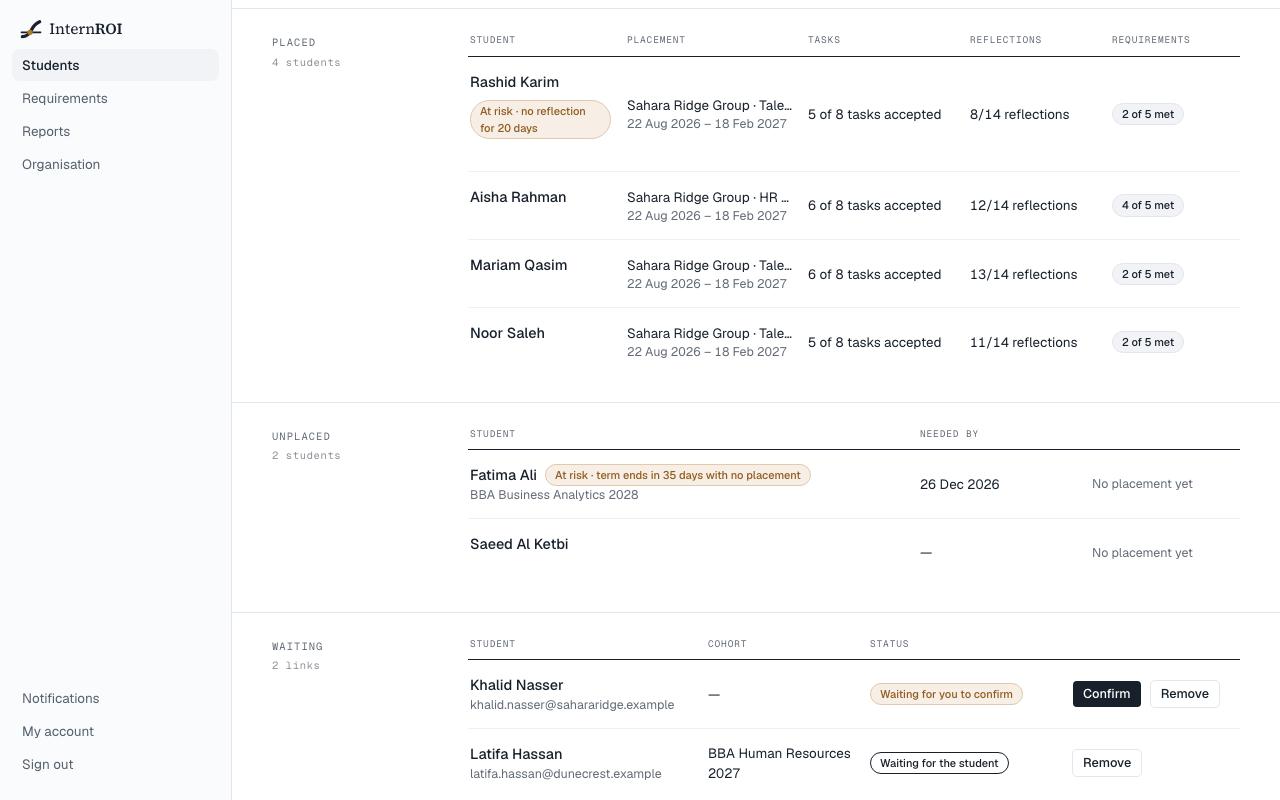
A student flagged by the early warning carries a pill such as “At risk · 2 tasks overdue”, and is listed first in their group. See When a student may need attention.
If a student has had several placements, the board shows the one still running, or else the latest. Sample programmes are never a placement.
One student’s page
Choose a student’s name. Their page shows:
- Attention — each flag, if any.
- Placement — Dates, Planned hours, Tasks with how many are overdue, Reflections with when the last was written and whether the final report is in, Last submission, Supervisors’ rating, and Completion as the company recorded it.
- Requirements — every rule you have switched on, with its evidence and verdict, for example “120 of 160 planned hours”.
- Completion report — whether one can be issued yet. See Issue a completion report.
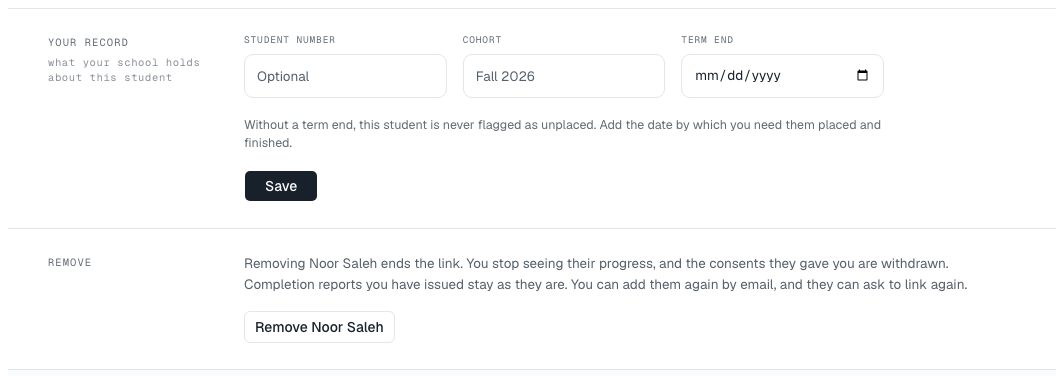
- Your record — the Student number, Cohort and Term end you hold for the student. Change them and choose Save. A student who linked to you themselves arrives with none, so add a term end here if you need them placed by a date.
- Remove — ends the link. Choose Remove followed by the student’s name, then Yes, remove — or Keep. You stop seeing their progress, and the consents they gave you are withdrawn. Completion reports you have issued stay under Reports, and you can add the student again by email.
What you can and cannot see
You see the company and programme by name, the department, the dates, the working week and hours per day, how many tasks were assigned, accepted and overdue, how many reflections were written and when, whether the final report is in, when work was last submitted, and whether the company marked the placement complete.
The supervisors’ average rating appears only if the student shares their ratings with you. Otherwise Supervisors’ rating reads “the student has not consented to share it”.
You never see a task’s title, anything the student or their supervisors wrote, an attachment, the company’s KPIs, or any cost or return figure.