Set up KPIs
Choose what the programme is measured on, and how much each measure counts.
KPIs are the measures a programme is judged against. Open the programme and choose Configure KPIs on the checklist, or KPIs in its menu and then Configure.
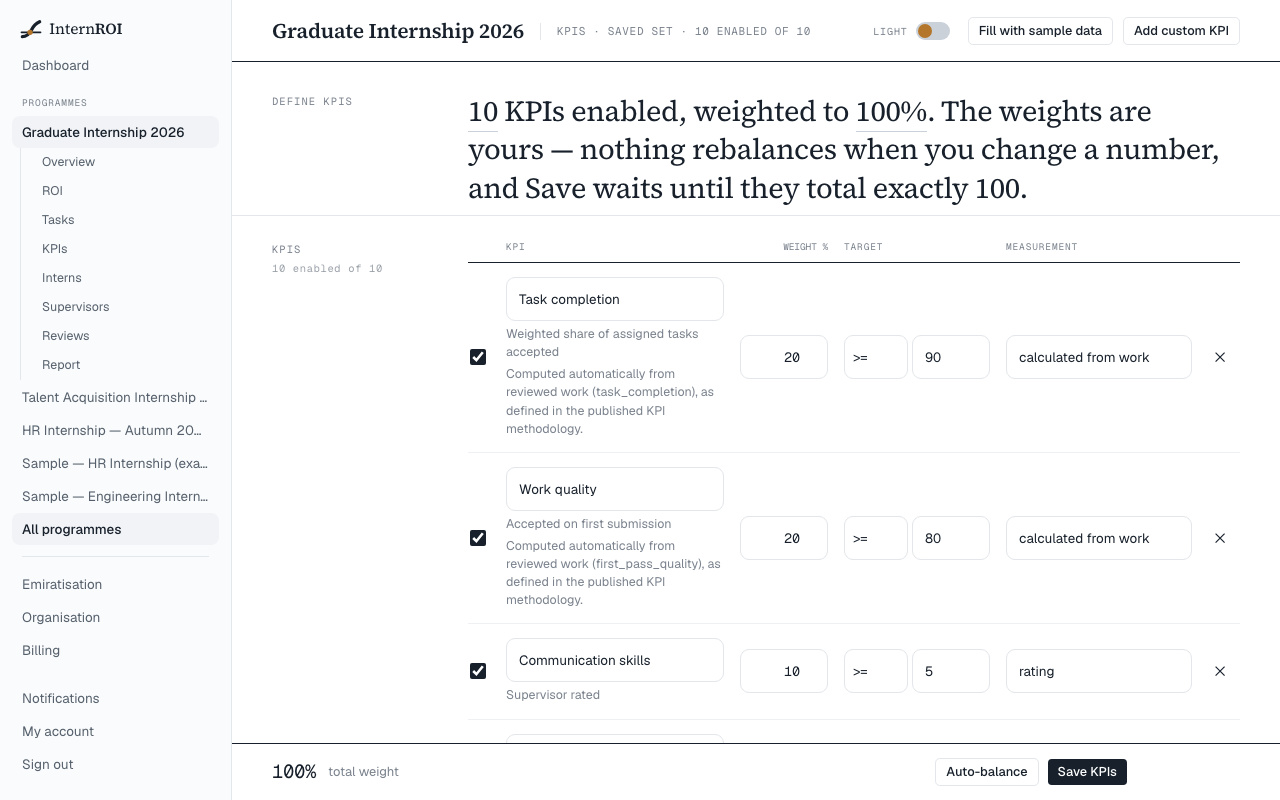
Choose and define KPIs
If a recommended set is offered, it is listed ready to edit — change it, reweight it or add your own. Otherwise, add your own with Add custom KPI. Fill with sample data loads an example set.
For each KPI:
- Tick it to enable it.
- Give it a name, a Weight %, and a Target (at least, at most, or exactly a value).
- Choose its Measurement — for example a percentage, a number, or a 1–5 rating that supervisors give when they review work.
Weights must total 100%
Unlike tasks, KPI weights are yours to set. Nothing rebalances when you change one. The bar at the bottom shows the total, and what to add or remove to reach 100%. Auto-balance scales the enabled weights to total exactly 100.
When the total is exactly 100%, choose Save KPIs.
Changing KPIs later
You can change KPIs while the programme is running. They lock when the programme ends.
Following progress
KPIs in the programme’s menu shows each KPI’s value against its target, whether it is on track or at risk, and what changed it. Values update when supervisors accept work, and a KPI stays not measured until accepted work feeds it.