Create a programme
Name it, date it and size it in three short steps.
Only company admins can create programmes.
- Choose New programme on your dashboard or under All programmes.
- Work through the three steps — Basics, Supervisors and Goal.
- Choose Create programme.
The programme is saved as a draft as soon as you finish the first step, so you can leave and come back.
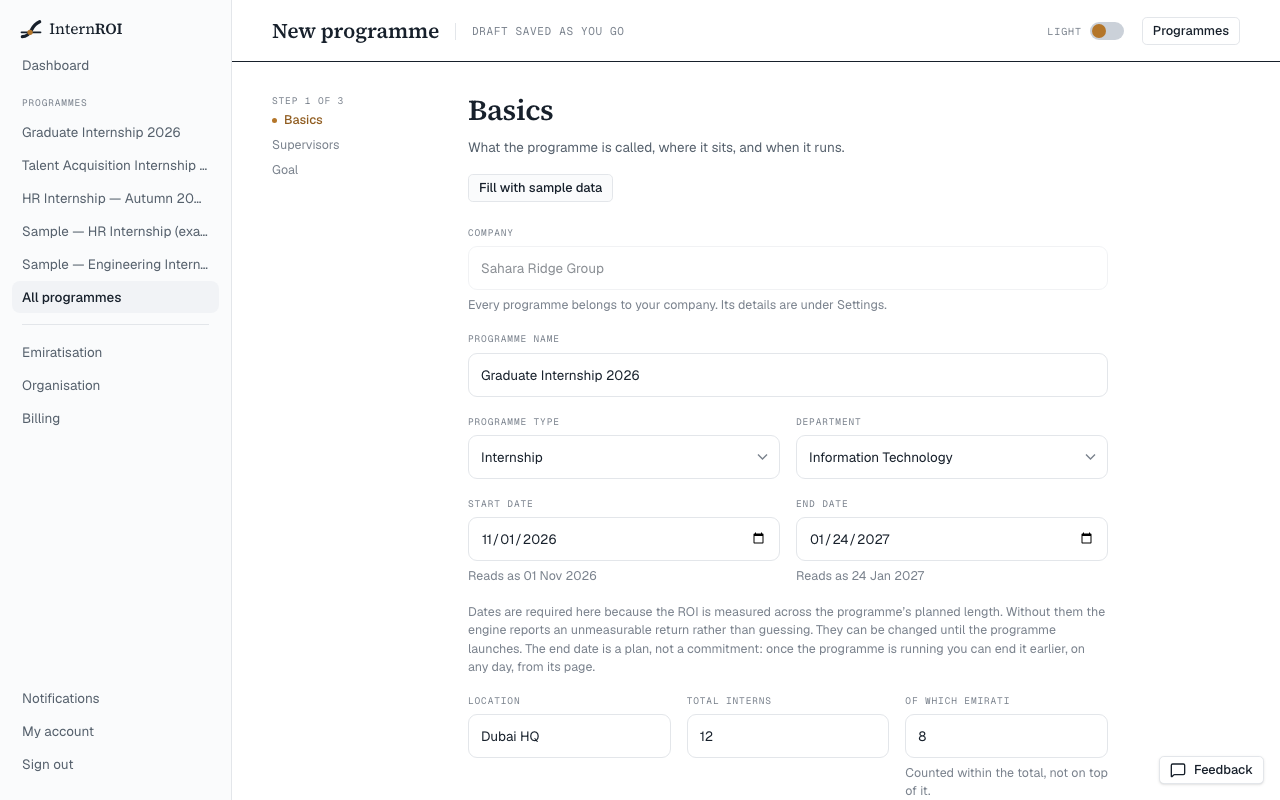
Step 1 — Basics
- Programme name.
- Programme type — Internship, Graduate, Traineeship, University Placement, Emirati Talent, or Other (then say which).
- Department — choose from the list, or Other (then say which).
- Start date and End date — both required, because the ROI is measured across the programme’s planned length.
- Location — optional.
- Total interns, and Of which Emirati — counted within the total, not on top of it.
The dates and counts can be changed until the programme launches. The end date is a plan, not a commitment: once the programme is running you can end it earlier, on any day.
Step 2 — Supervisors
How many supervisors? — a count only. You add them by name later, on the Supervisors screen.
Step 3 — Goal
Objectives — tick every one that applies: Emirati talent development, Talent pipeline, Productive contribution, Graduate hiring, University partnership. This is a label for your own records; it does not change any figure.
After you create it
The programme opens on its setup checklist. Six steps get it ready to launch — see Get a programme ready to launch.
To change the details before launch, open the programme and choose Programme details on the checklist. After launch, the details are locked.
Messages you might see
- End date must be after the start date
- Emirati interns cannot exceed total interns
- Add a start date — the return is measured across the programme